Android 13 Mini Projector: 1080p, 380 ANSI, WiFi
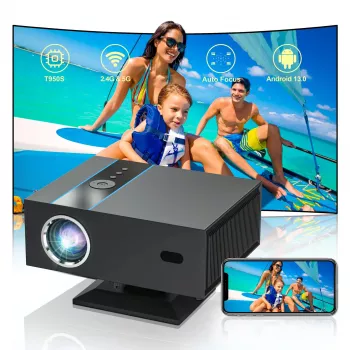
Full HD 1080P Mini Projector with Android 13, 380 ANSI Lumens, WiFi & Bluetooth
A compact projector can turn a bedroom wall, dorm room, or small living space into a flexible screen for movies, sports, casual gaming, and presentations. This guide breaks down what to expect from a Full HD mini projector with Android 13, 380 ANSI lumens, WiFi, and Bluetooth—how it looks in real rooms, how to set it up, and which connections make daily use easier. For more guidance, see Portable Smart Projector [Google TV 14.0 & 4K Support & Dolby ….
At a glance: what this mini projector is built for
- Full HD 1080P playback for sharper text and cleaner edges on subtitles and UI elements.
- Android 13 onboard for app-based streaming without needing a separate media stick.
- 380 ANSI lumens geared toward dim or dark rooms for the best contrast and color.
- WiFi for wireless streaming/casting options (device and app dependent).
- Bluetooth for pairing speakers or headphones to improve sound and reduce cable clutter.
- Portable footprint suited for quick room-to-room use and travel setups.
Brightness is commonly discussed using ANSI lumens; if you want the technical context behind the measurement, see the reference definition of ANSI lumens.
Picture quality expectations in real rooms
With 380 ANSI lumens, the most satisfying results come from controlling ambient light. Think “movie night” conditions rather than a sunlit living room with open blinds. When the room is darker, blacks look deeper, colors appear more saturated, and the image holds up better at larger sizes.
- Best viewing happens with lights low: evening viewing, darker rooms, or shaded spaces will look more punchy.
- Keep the projector square to the surface: extreme tilt can soften edges and make focus uneven from corner to corner.
- Use a neutral wall or basic screen: smoother, lighter neutral surfaces reduce color shift and boost perceived contrast.
- Match image size to your lighting: very large images can look less vivid in brighter rooms; scaling down often looks better.
- Presentations benefit from high contrast: dim the room, use larger fonts, and favor simple layouts.
Room lighting and recommended use
| Room condition | Recommended use | What to adjust |
|---|---|---|
| Dark room (night, curtains closed) | Movies, series, casual gaming | Increase image size; use standard picture mode |
| Dim room (lamp on, some spill light) | Sports, kids content, light gaming | Reduce image size; raise contrast; position carefully |
| Bright room (daylight, overhead lights) | Quick viewing, basic presentations | Use smallest practical image; darken room if possible |
Android 13: streaming, apps, and daily convenience
Android 13 built in can make a mini projector feel more like an all-in-one entertainment hub: install common streaming apps, sign in once, and launch content without plugging in another device. It’s especially convenient for a bedroom or dorm setup where minimizing cables and accessories matters.
- Practical expectations matter: app availability and maximum playback quality can vary by region, DRM requirements, and app updates.
- Navigation can be easier with accessories: if supported, pairing a Bluetooth remote, air mouse, or compact keyboard can speed up search and sign-ins.
- Keep the system running smoothly: uninstall what you don’t use, keep storage free, and update apps periodically.
- Simple workaround if an app is limited: an external streaming stick, laptop, or game console over HDMI is often the quickest fix.
WiFi and Bluetooth: how to connect without hassle
Wireless features are where mini projectors can feel surprisingly modern. WiFi helps with built-in streaming apps, software updates, and supported casting/mirroring. Bluetooth helps most with audio—pairing a better speaker can transform the experience more than almost any picture tweak.
- WiFi: place the projector where the signal is stable; weak WiFi can cause buffering or reduced quality.
- Bluetooth: pair to a soundbar, powered speaker, or headphones to improve clarity and volume while reducing cable clutter.
- Latency note: for gaming or fast-paced action, wired connections (HDMI + wired audio) are typically more responsive than wireless audio.
- If audio drifts out of sync: check app/player audio delay settings or switch to a wired output when possible.
Setup checklist for a sharper, straighter image
Who it fits best (and when to consider a different class of projector)
Product details and where to get it
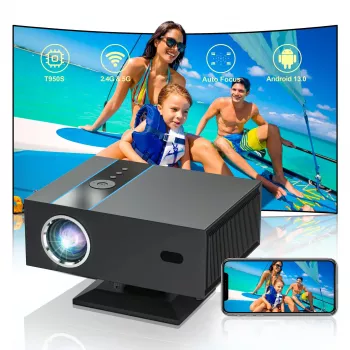
If you want an all-in-one mini projector experience—Full HD playback, onboard Android for apps, plus WiFi and Bluetooth for everyday convenience—this model is available now: Full HD 1080P Mini Projector with Android 13, 380 ANSI Lumens, WiFi & Bluetooth. Listed price: $205.01 (subject to change).
Quick specs summary
| Feature | What it means for use |
|---|---|
| 1080P Full HD | Sharper playback for movies, subtitles, and menus |
| 380 ANSI lumens | Best in dim/dark rooms; manage ambient light for best results |
| Android 13 | Apps and streaming without a separate media player (app support varies) |
| WiFi | Wireless streaming/casting options and updates (device/app dependent) |
| Bluetooth | Pair speakers/headphones to improve sound and reduce cables |
Other in-stock items
- Porcelain Dinnerware Set
- Is Carsharing the Right Choice for You – Practical Guide Exploring for Smarter, Cheaper, Greener Transportation Decisions
- Easy Holiday Potluck Bundle on a Budget – 3-in-1 Digital Download
FAQ
Is 380 ANSI lumens enough for daytime viewing?
It works best in dim or dark rooms. In daylight or under bright overhead lighting, keep the image smaller and reduce ambient light (curtains closed, lights off) to preserve contrast.
Can Bluetooth speakers be used with this projector?
Yes—Bluetooth pairing is designed for external speakers or headphones. If you notice audio delay, try adjusting audio sync in the app/player (when available) or switch to wired audio for tighter timing.
Do streaming apps work directly on Android 13 without a TV stick?
Many apps can run directly on the built-in system, but availability and playback quality can vary due to region and DRM requirements. If a specific app is limited, using HDMI with a streaming device is a reliable alternative.













Leave a comment